Display & Settings (LT01)

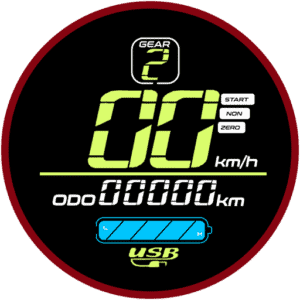
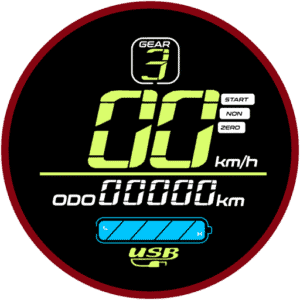
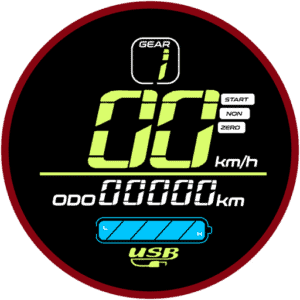
This scooter is equipped with an LT01 display throttle. It has a beautiful color screen to display the necessary information at a quick glance. It also has a Type-A USB port on the side that adds the convenience of charging your devices while on the go.

Display Parameters

  • Power Button – To turn the electric scooter ON or OFF, press the power button for 3 seconds. 
  •  Mode Button – The mode button allows you to toggle through different display parameters when the electric scooter is turned ON. The available parameters are further elaborated below.
  • GEAR – This electric scooter can be switched between three gears. Think of it as a “speed limiter” where gear 1 sets the electric scooter to its slowest speed while gear 3 sets it to the highest speed. Unlike conventional vehicles where you have to start with the lower gear and shift to the higher one as you move, electric scooters allow you to start with the top gear right away if you want to. You would want to switch to lower gear when you are riding in a busy area and use a higher gear when the street is less crowded.
  • Speed-o-meter – The two large digits on the display shows the speed that the electric scooter is cruising at. 
  • Battery Indicator – The battery indicator shows a rough estimate of the battery level of the electric scooter. Typically, when the battery drops down to the last block, you should be getting ready to recharge the electric scooter. 
  • Throttle – The throttle stick functions as the electric scooter’s accelerator. It is a variable throttle, which means, the electric scooter’s speed changes according to how deep the throttle is pressed. If the “kick start” mode is enabled (indicated by the “Zero” icon on the display), you will need to give the electric scooter a gentle push to glide before pressing the throttle to get it moving.
Important

Don’t wait for the battery to fully drain. Recharge the scooter when there’s only one or two bars left to help protect the battery and extend its lifespan.

Basic Operation (LT01)

Changing Gears & Speed Control

The electric scooter has three gears:

Gear 1
Gear 2
Gear 3
  • Gear 1 – Slowest speed
  • Gear 2 – Medium speed
  • Gear 3 – Maximum speed

To switch between the gears, first, press the Power Button. This will cause the gear number on the display to flash. While it is flashing, press the Mode Button to cycle through your preferred gear. To stop the gear from flashing, you can either press the Power Button again, or leave it for 2 seconds and it will stop flashing automatically.

Switching Display Modes

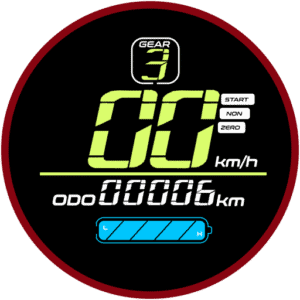
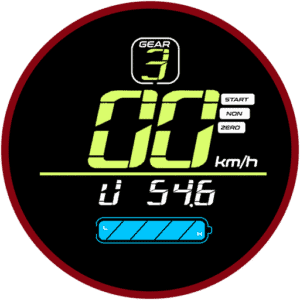
While the scooter is turned ON, pressing the Mode Button cycles through several parameters that gives you a quick glance at necessary information. The modes will cycle between the following:
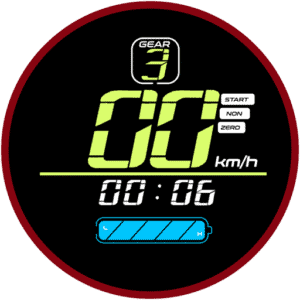
Time
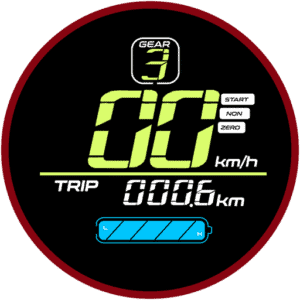
Trip
Odometer
Voltage
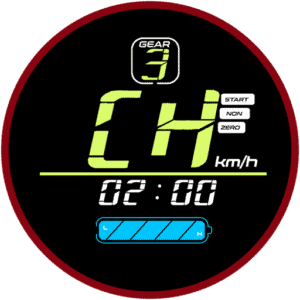
CH 02:00
Mode Function
TIME Shows how long the electric scooter has been powered on. Resets every time the electric scooter is turned on.
TRIP Displays the distance traveled since you turned the scooter on. Resets every time the electric scooter is turned on.
ODOMETER Indicates the total distance the electric scooter has traveled.
VOLTAGE Shows the current battery voltage.
CH 2:00 Charging mode. Keeps the electric scooter powered ON for 2 hours (overrides auto shut-off setting) so you can use the display’s USB port to charge devices like your phone.

P-Settings Guide

The P-Settings menu lets you fine-tune advanced settings for your electric scooter. Always double-check settings before riding. If you’re unsure, stick with the factory defaults to keep your electric scooter performing at its best.

How to Access P-Settings (LT01)

Acess P-settings

Here’s a simple video guide on how to access and edit the P-settings.

To access the P-Settings menu on your electric scooter:

  1. Press and hold the Power Button and Mode Button simultaneously at the same time for 2 seconds.
    This will open the advanced settings menu.

  2. Insert the password to enter the P-settings menu.
    The default password is 1500. Use the  Mode Button to increase the value and Power Button to move to the next digit. Once you have entered the password, long press the Power Button to enter the P-settings.

  3. Use the Mode Button to cycle through the P-settings.
    Each press switches to the next setting.

  4. To select a setting to change, press the Power Button.
    Then, adjust the value:

    • Mode Button: Increase the value.

    • Power Button: Decrease the value.

  5. To confirm and return to the P-Settings menu, wait 2 seconds.
    To exit P-Settings completely and return to normal riding mode, wait another 3 seconds or press the Mode Button and Power Button simultaneously again.

Here’s what each P-setting does:

P-SettingFunction
P0Tire Diameter
Sets the wheel size in inches. This helps the display calculate speed and distance accurately.

eg: If your scooter uses 8 inches tyres, use 8 in the settings. If it uses 10 inches, use 10 in the settings.

P1Controller Shut-Down Voltage
Sets the minimum voltage at which the controller cuts off power to protect the battery.

Depending on your electric scooter, set the value accordingly:
36V = 31.5
48V = 42.5
52V = 43.5
60V = 53.0

P2Motor Magnetic Pole Setting
Defines the number of magnetic poles in the motor. This affects speed reading accuracy.

Default: 30 – do not change.

P3Speed Signal Selection
Adjusts how the controller reads the speed signal.

Default: 0 – do not change.

P4Unit of Measurement
Switch between kilometers and miles for distance and speed display.

0 = Kilometers
1 = Miles

P5Kick Start Mode
Choose how the throttle responds:

0 = Immediate start – the throttle works as soon as you press it.
1 = Non-Zero Start (kick-and-go) – the throttle only works after you push off to get rolling.

P6Cruise Control
Enable or disable cruise control. If enabled, when cruising at the same speed for 7 seconds, the cruise control will be activated and the electric scooter will continue gliding at the set speed. Hitting the throttle or the brakes will cancel the cruise control operation.

0 = Off
1 = On
Default: 0 – enable only if you’re an experienced rider. Do not underestimate this feature.

P7Initial Acceleration
Sets how aggressive the initial take-off is. This adjusts the torque of the electric scooter:

0 = Strong Acceleration
1 = Safer, smoother start
Default: 1 – strong acceleration is recommended only for experienced riders.

P8Electronic Brakes System (EBS)
Turns electronic braking on or off. EBS uses electronic signals to control braking force, offering enhanced safety and braking performance in combination with the disc brakes.

0 = Off
1 = On
Default: 1 for stronger braking performance.

P9Maximum Power Percentage Limit
Sets a limit to the maximum power in percentage. This setting alters the overall performance of the electric scooter, useful if you would like to tame the electric scooter performance for less experienced riders.

100 = No limit, 100% power
5 – 99 = Reduced power, eg: setting 80 will limit the performance to 80%
Default: 100

PAOdometer Reset
Only usable at factory level for Quality Control (QC) purposes.
PBAuto Power-Off Timer
Sets how many minutes the electric scooter stays on when idle before turning off automatically.

5 = 5 minutes before the electric scooter turns off automatically.

PCDisplay Brightness
Adjusts the brightness level of your display:

1 = Low
2 = Medium
3 = High
Default: 3 for better outdoor visibility


Important

Make changes only if you understand each option, as incorrect settings may affect performance or safety.