







YOUR CART
- No products in the cart.
Subtotal:
RM0.00
Know what you need? Ride straight to it.
The Kaabo Mantis Urban is a lightweight and compact electric scooter designed for city riders who demand portability without compromising on power. Formerly known as the Kaabo Mantis Mini, this updated version carries Kaabo’s signature DNA – agile handling, solid construction, and a touch of style – now optimized for urban mobility.
Ideal for short commutes and daily city rides, the Mantis Urban features a powerful single motor, rear suspension, and an NFC-enabled K1 display system for added security. With its simplified frame and lighter build, this model offers an excellent entry point for new riders or anyone who values both performance and practicality.
Whether you’re weaving through traffic, catching the train, or storing it in your apartment, the Kaabo Mantis Urban is made to fit right into your city lifestyle.
This section is crucial for your safety and the longevity of your electric scooter. Please read and understand all the safety instructions before your first ride. Jerung Wheels will not be held responsible for any damage, injury, or legal issues resulting from misuse or neglect of these safety guidelines.


Do Not Ride in Rainy Conditions
Water can damage electrical components and increase the risk of slipping. Always ride in dry weather.
Avoid Self-Repairs
Attempting repairs without proper knowledge may lead to electric shock or further damage. Always consult authorized technicians. If your electric scooter is misbehaving, please send it to our award winning Jerung Medic after-sales service centre.
Obey Local Traffic Laws
Respect local regulations regarding electric scooter usage, including speed limits and allowed zones.
No Stunts or Acrobatics
This scooter is built for commuting, not tricks. Performing stunts may lead to serious injury.
One Rider Only
Never allow more than one person to ride the scooter at a time.
Wear Safety Gear
Always wear a helmet, gloves, and elbow/knee pads for protection during your ride.
Practice Before Riding on Roads
Start in an open, obstacle-free area to get comfortable with the electric scooter before venturing into traffic.
Adjust Handlebar Height
If you have an adjustable pole, ensure the T-bar is adjusted to a comfortable height to maintain control and avoid injury.
Charge Before First Ride
Fully charge the electric scooter before using it for the first time to optimize battery performance.
Never Power Off While Riding
Turning off the electric scooter mid-ride can result in loss of control.
Avoid Large Steps or Curbs
Do not attempt to climb steps higher than 3 cm, as this could cause tipping and injury.
Mind the Temperature
Use and store the electric scooter in environments between -5°C and 50°C for optimal performance and battery life.
Monthly Charging for Long-Term Storage
If the electric scooter is unused for long periods, charge it at least once a month to preserve battery health.
Avoid Deep Water and Spraying
Do not ride through puddles deeper than 5 cm or expose the electric scooter to direct water spray. This can cause electrical failures.
Keep Both Feet on the Deck
Always stand with both feet firmly on the deck while riding to maintain balance and control.
Exceeding local speed limits or ignoring traffic laws can result in injury or legal consequences. Ride responsibly at all times.
Before hitting the road, it’s important to know how to properly open and fold your Kaabo Urban electric scooter. Follow these steps to ensure your ride starts and ends smoothly.
Always make sure the folding lock is fully secured before riding. An unlocked mechanism can cause serious accidents.
Lift the safety lock at the side to release the locking mechanism. Then, pull the folding latch and fold the pole. Finally, insert the hook into its slot on the deck.
Release the hook from its slot on the deck and lift the pole. Once the pole is straight up, press the latch to secure the pole. The safety lock will be automatically engaged.

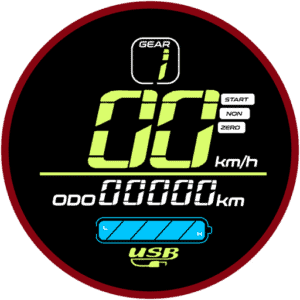
This scooter is equipped with an LT01 display throttle. It has a beautiful color screen to display the necessary information at a quick glance. It also has a Type-A USB port on the side that adds the convenience of charging your devices while on the go.
Don’t wait for the battery to fully drain. Recharge the scooter when there’s only one or two bars left to help protect the battery and extend its lifespan.
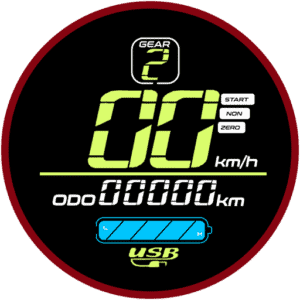
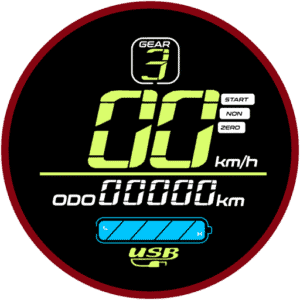
The electric scooter has three gears:


To switch between the gears, first, press the
Power Button. This will cause the gear number on the display to flash. While it is flashing, press the
Mode Button to cycle through your preferred gear. To stop the gear from flashing, you can either press the
Power Button again, or leave it for 2 seconds and it will stop flashing automatically.
While the scooter is turned ON, pressing the
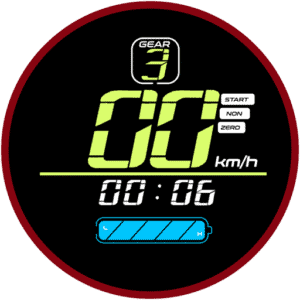
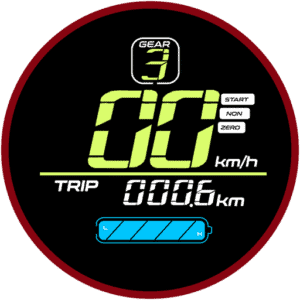
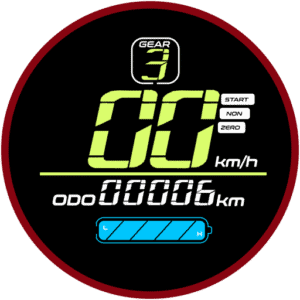
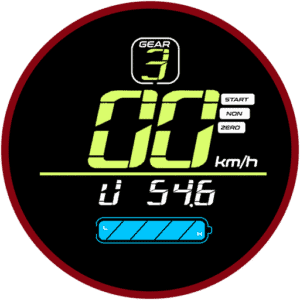
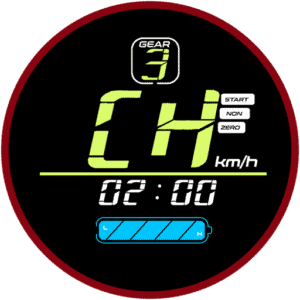
Mode Button cycles through several parameters that gives you a quick glance at necessary information. The modes will cycle between the following:
| Mode | Function |
|---|---|
| TIME | Shows how long the electric scooter has been powered on. Resets every time the electric scooter is turned on. |
| TRIP | Displays the distance traveled since you turned the scooter on. Resets every time the electric scooter is turned on. |
| ODOMETER | Indicates the total distance the electric scooter has traveled. |
| VOLTAGE | Shows the current battery voltage. |
| CH 2:00 | Charging mode. Keeps the electric scooter powered ON for 2 hours (overrides auto shut-off setting) so you can use the display’s USB port to charge devices like your phone. |
The P-Settings menu lets you fine-tune advanced settings for your electric scooter. Always double-check settings before riding. If you’re unsure, stick with the factory defaults to keep your electric scooter performing at its best.
Here’s a simple video guide on how to access and edit the P-settings.
To access the P-Settings menu on your electric scooter:
Press and hold the
Power Button and
Mode Button simultaneously at the same time for 2 seconds.
This will open the advanced settings menu.
Insert the password to enter the P-settings menu.
The default password is 1500. Use the
Mode Button to increase the value and
Power Button to move to the next digit. Once you have entered the password, long press the
Power Button to enter the P-settings.
Use the
Mode Button to cycle through the P-settings.
Each press switches to the next setting.
To select a setting to change, press the
Power Button.
Then, adjust the value:
Mode Button: Increase the value.
Power Button: Decrease the value.
To confirm and return to the P-Settings menu, wait 2 seconds.
To exit P-Settings completely and return to normal riding mode, wait another 3 seconds or press the
Mode Button and
Power Button simultaneously again.
Here’s what each P-setting does:
| P-Setting | Function |
|---|---|
| P0 | Tire Diameter Sets the wheel size in inches. This helps the display calculate speed and distance accurately.
|
| P1 | Controller Shut-Down Voltage Sets the minimum voltage at which the controller cuts off power to protect the battery.
|
| P2 | Motor Magnetic Pole Setting Defines the number of magnetic poles in the motor. This affects speed reading accuracy.
|
| P3 | Speed Signal Selection Adjusts how the controller reads the speed signal.
|
| P4 | Unit of Measurement Switch between kilometers and miles for distance and speed display.
|
| P5 | Kick Start Mode Choose how the throttle responds:
|
| P6 | Cruise Control Enable or disable cruise control. If enabled, when cruising at the same speed for 7 seconds, the cruise control will be activated and the electric scooter will continue gliding at the set speed. Hitting the throttle or the brakes will cancel the cruise control operation.
|
| P7 | Initial Acceleration Sets how aggressive the initial take-off is. This adjusts the torque of the electric scooter:
|
| P8 | Electronic Brakes System (EBS) Turns electronic braking on or off. EBS uses electronic signals to control braking force, offering enhanced safety and braking performance in combination with the disc brakes.
|
| P9 | Maximum Power Percentage Limit Sets a limit to the maximum power in percentage. This setting alters the overall performance of the electric scooter, useful if you would like to tame the electric scooter performance for less experienced riders.
|
| PA | Odometer Reset Only usable at factory level for Quality Control (QC) purposes. |
| PB | Auto Power-Off Timer Sets how many minutes the electric scooter stays on when idle before turning off automatically.
|
| PC | Display Brightness Adjusts the brightness level of your display:
|
Make changes only if you understand each option, as incorrect settings may affect performance or safety.
We have meticulously selected some of the best electric scooters and electric bicycle brands in the world for your selection. Buy with confidence, all products come with 1 year Jerung Medic warranty.